Showing posts with label IPython. Show all posts

Sunday, September 4, 2011

No IPython v0.11 support in Spyder's console, but standard Python interpreter enhancements

It's been a month since IPython v0.11 public release and I've been trying to solve issues related to IPython support in Spyder's console, all in vain. At first, I thought that it was only a problem on Windows platforms, but apparently it is not. The more I think about it (and the more I spend time on it), the more I doubt that there will ever be a decent support of IPython >=v0.11 in Spyder's console. In the meantime, I have fixed a couple of bugs related to the new IPython plugin: this new plugin will probably be the only way to run IPython >=v0.11 within Spyder.

So, to compensate this lack of IPython support in Spyder's console, I have implemented the following enhancements for the standard Python interpreter (this is not much, but it provides all the IPython features I am using personnally):

  1. I have fixed the PyQt input hook issue on Windows platforms. Before this revision, the console was crashing (non-responsive actually) on Windows platforms after trying to manipulate Qt objects interactively, like interactive plotting with Matplotlib for example. Now, when enabling the "Replace PyQt input hook by Spyder's" option (which is enabled by default on Windows platforms), the standard Python interpreter may be used to do interactive plotting, even on Windows.
  2. Plus, I have implemented some basic special commands in the standard Python interpreter (see here more details), adding support for %pwd, %ls, %clear or !dir (or !ls on UNIX platforms), etc. (I haven't implemented the %edit, %run and other similar commands which have really no use within Spyder).
  3. And I have fixed a bug with PYTHONSTARTUP substitution option (the packages imported in the startup script were not available in the Python interpreter).

These three changesets were intended to facilitate the use of standard Python interpreter as an interactive computing shell. I've also created two PYTHONSTARTUP scripts (on my machine), one to support Matplotlib's pylab interface and the other to support guiqwt's interactive plotting mode:

  • Matplotlib's startup script:
print "Running pylab startup script...",
# Import modules following official guidelines:
import numpy as np
import scipy as sp
import matplotlib as mpl
import matplotlib.pyplot as plt
# Pollute the namespace but also provide MATLAB-like experience:
from pylab import *
# Enable Matplotlib's pylab mode:
ion()
print "done."
  • guiqwt startup script:
print "Running guiqwt startup script...",
# Import modules following official guidelines:
import numpy as np
import scipy as sp
import guiqwt.pyplot as plt
import guiqwt.io as io
# Pollute the namespace but also provide MATLAB-like experience:
from numpy import *
from guiqwt.pyplot import *
# Enable guiqwt's interactive mode:
ion()
print "done."

With these startup scripts, I have my own IPython shell (not as powerful as IPython, of course) but it suits my needs... why not yours?

To select you own startup script, go to Tools > Preferences > Console > Advanced settings:
I think I'll add these startup scripts to Spyder v2.1 but I don't know how exactly. Maybe the simplest way would be to change the settings GUI above and add a third choice: "Build-in startup script: " with a combo box allowing to choose a script between the two scripts above (and others).

Saturday, August 13, 2011

Preview of the new IPython plugin for Spyder

Here is a first preview of the new IPython plugin which will be available in Spyder v2.1 (to be released in September 2011, but the first beta will hopefully be available in a few days):


Important notes :

  • This feature is still experimental and will remain so until Spyder v2.2 (scheduled for December 2011).
  • It requires IPython v0.12dev (i.e. the current IPython development version, available through the github repository).

The idea is to start a new IPython kernel within the "Console" plugin (bottom left of the screenshot above), then a new IPython frontend dockwidget is created automatically (top left of the screenshot above). This first implementation already supports the Variable Explorer (top right of the screenshot above) through the IPython kernel associated to the frontend but nothing else is supported (link with the Editor, the Object Inspector, and so on).

In the "Console" plugin preference page, the user may change the IPython kernel command line options (defaults are: "python --pylab=inline").

Tuesday, August 9, 2011

IPython has taken a huge step forward!

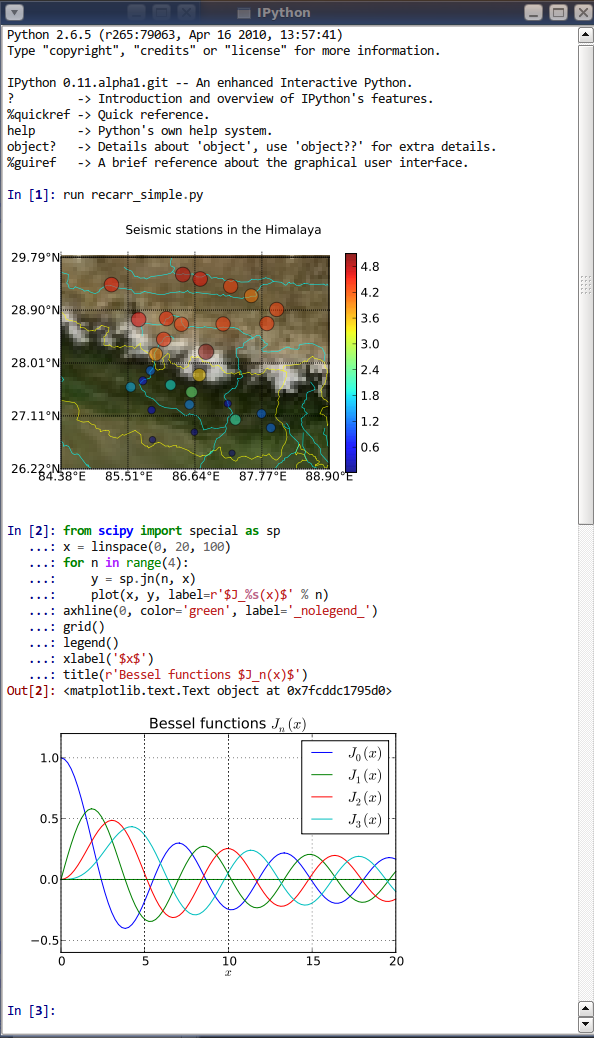
Two years of efforts were necessary for the IPython development team to achieve their goal and take a huge step forward with IPython v0.11, providing a powerful interactive shell with outstanding new features, a cleaner source code... and a brand new great-looking website! (at last... the old one was really minimalist)

To my opinion, the most impressing new feature is the standalone Qt console (see the screenshot below): combined with the brand new "inline pylab mode", it allows plotting figures directly in the console itself, between lines of code (like in a notebook).


But there are other interesting new features such as high-level interactive parallel computing features, an improved vim integration, an integration in Python Tools for Visual Studio and support for Python 3 (the last major scientific library which does not support Python 3 is now matplotlib... hurry up guys!).

New IPython v0.11 breaks Spyder's IPython support
Unfortunately for Spyder users, this new version will break the IPython support within the "Console" plugin. We were not expecting this release until a few weeks from now, so we were not able to prepare Spyder for this.
However, some preliminary changes were made to both v2.0 and v2.1 branches to make them compatible with IPython v0.11:

  • For v2.0.12 users, simply copying and replacing the original files by the following should be sufficient to add support for IPython v0.11 (at least on Linux and MacOS X):
  • If you are using the development version (v2.1.0), you may simply update your local repository.
Support for IPython v0.11 in Spyder's Console
Anyway, the most disappointing thing about IPython v0.11 for Spyder users is that it's now using Python's PyOS_InputHook mechanism to support GUI event loops. This is, from a general point of view, a good thing because this is much cleaner than the old thread-based implementation. But, on Windows platforms, PyQt's input hook is implemented in such a way that, when enabled, it's blocking the standard output redirection pipe with the remote process (I don't know why), thus blocking the whole shell (that's why an option to disable the PyQt's input hook was added a long time ago to Spyder's console preferences and this option is enable by default on Windows platforms). In other words, when running IPython in pylab mode (i.e. with matplotlib's interactive mode turned on), matplotlib's figures will freeze. That's why there is a warning message in Spyder v2.1.0 when it's running with IPython v0.11 on Windows: "Spyder does not support GUI interactions with IPython >=v0.11 on Windows platforms (only IPython v0.10 is fully supported).".

The future of IPython support in Spyder
Currently, in Spyder v2.0.12 and v2.1.0, IPython is supported simply by running an IPython shell in Spyder's console: a Python script running an IPython shell is executed in a separate process (QProcess). This was a very efficient way to support IPython, as there was a lot of code refactoring between the pure Python interpreter and the IPython interpreter (code completion, variable explorer, ...).
Now that IPython v0.11 is using a two-process model like Spyder, they were able to implement a GUI-based console (the "standalone Qt console" mentioned above) which could be integrated directly into Spyder.
What needs to be done:

  1. The first step to make it possible is to add support for PyQt's API #2 in Spyder: this is now done (see previous post)
  2. Implement a specific "IPython plugin" that will encapsulate the IPython Qt console widget
  3. Add options support to customize IPython
  4. Add links with the Editor (run scripts, run selection, debug, breakpoints support, ...) and the Object inspector
  5. Add support for the Variable explorer (after some tests, I think this is a hard one and will probably require a lot of interactions with the IPython development team)
This is a lot of work but it's worth the effort.